Sparrow On-Demand Getting Started Guide
Quick Start
In this guide, we will learn how to use the Sparrow On-Demand product by connecting to Sparrow On-Demand, performing analysis, checking the results, checking the usage, etc.
🙍♂️ Account Registration
- To create an account, please go to Inquiry on the Sparrow homepage(https://sparrow.im).
- Leave an inquiry under Inquiry Contents select 'Product & Service' and In Item select 'On-Demand'. Sparrow will issue an account for you.
- For more details, see Account Registration.
🔑 Token Issuance
- Log in to Sparrow On-Demand with your issued account. In the top right corner, click My Account and generate a personal or organizational API key.
- The generated API key should be entered in the API header or as a parameter in the SDK.
- For more details, see Token Issuance.
⚙️ Environment Setup
- Configure your environment to send API requests for analysis.
- Prepare the target to be analyzed — source code, repository, or URL.
🎯 Perform Analysis and Downlaod Results
- Send an analysis request via API Analysis Request API or execute it suing the Java SDK or Node.js SDK.
- Once the analysis request is sent, you can check its status via analysis callbacks. Use the Analysis Result Download API.
- For more information, see Analysis Request and Callback.
📃 View Analysis Results
- The analysis results include issues detected in your source code, repository, or URL. For more details about the downloaded result files, refer to Analysis Result File.
- If the analysis fails, the cause will be displayed as a result code. See Result Code for more details.
User Guide
Account Registration
To use the APIs or SDKs provided by Sparrow On-Demand, you must first obtain an API key. An API key requires a registered user account. You can register an account as follows:
- Go to the Inquiry on the Sparrow homepage(https://sparrow.im).
- Enter the Customer Information.
- In Inquiry Contents, for Category, select Product & Service, and in Item, select On-Demand.
- Enter a Title and in the Content section leave a message stating you would like to try Sparrow On-Demand..
- Sparrow will issue an account for you.
Once you receive your account, proceed to generate your API key.
Only customers who have signed a Sparrow On-Demand Solution Partnership Agreement with Sparrow Co., Ltd. can officially use the Sparrow On-Demand service. Partner customers receive their account ID and password upon completion of the partnership contract.
Token Issuance
An API key is required to use Sparrow On-Demand. The API key authenticates users who access the API or SDK over the network.
Every request sent to the service must include your 'API key'.
All analyses performed using that 'API key' will be attributed to the corresponding customer.
You can obtain a token for use as your API key by following these steps:
-
Log in to Sparrow On-Demand using your the registered account ID and password.
-
Click your Username > My Account in the top-right corner.
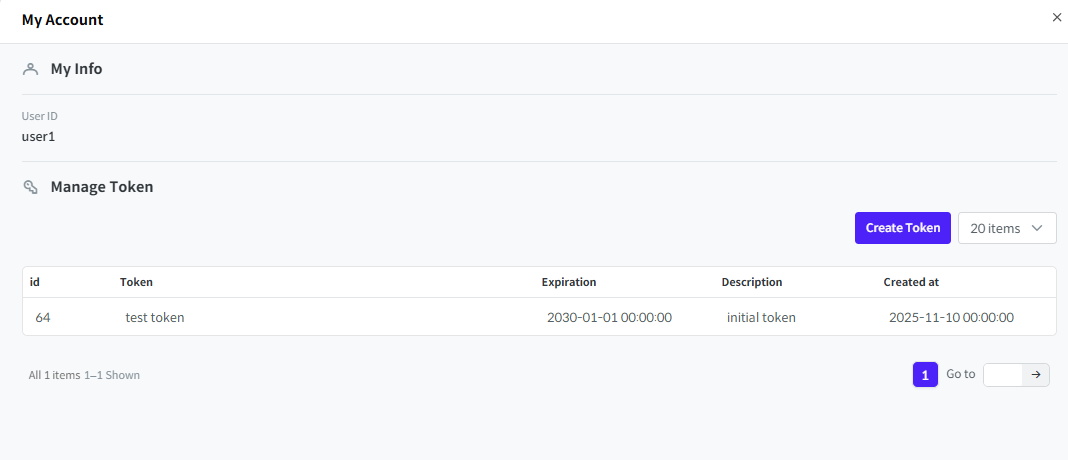
- IN Token Management, click Add Token.
- Enter the Expiration Time and Description, then click Add button.
- Your token will be issued.
Use the issued token by including it in the Token Bearer header for API calls, or as a parameter when creating an SDK client
Analysis Request and Callback
Users can receive information about their requested analysis through callbacks.
Specify the types of callbacks and the callback server when sending an analysis request.
- Analysis Request Process
- Callback Types
There are two types of callbacks.
- Sends a callback whenever the analysis status changes or information is updated.
- Sends a callback when the analysis process finishes (Success, Failure, or Stop).
- Callback Server
Two callback servers can also be specified according to the callback.
- Status Callback Server: The user's server to receive analysis status callbacks.
- Completion Callback Server: The user's server to receive analysis completion callbacks.
You may set the same URL for both callbacks if you want to receive them on the same server.
Analysis Result File
When an analysis is completed, you can download the results as a file using the Analysis Result Request API.
Click here to download a sample result file.
result.zip/
    /summary.json
    /asset
    /sbom
        SPDX.spdx
        CycloneDX.json
        SWID.zip
        ...
    /licenseNotice
        HTML.html
        MARKDOWN.md
        TXT.txt
    /issue
        1.json
        2.json
        ...
    /workMessage.json
The results are compressed into result.zip. For detailed information, see here.
summary.json: Summary information about the analysis, including total vulnerabilities, analysis time, etc.asset: Contains data about each identified analysis target (source code, repository, or URL).- Static(Source code) and component(open source) analysis: List of files subject to analysis
- Dynamic(Web vulnerability) analysis: List of collected URLs
issue: A folder containing information about issues detected in the analysis. The folder contains multiple json files containing issue information. Note that the issue information provided varies depending on the analysis.- Static(Source code) analysis: Issue detection rule name, file, line, etc.
- Componet(Open source) analysis: Issue detection rule name, open source name, license information, etc.
- Dynamic(Web vulnerability) analysis: Issue detection rule name, target URL, request information including parameters, etc.
workMessage.json: Includes warnings or important notes related to the analysis.licenseNotice: A folder containing license notices. The folder contains files in text (.txt), markdown (.md), and HTML (.html) formats. For detailed information, please refer to License Notice.sbom: A folder containing SBOM files. Multiple SBOM files are included according to format and version. For detailed information, please refer to SBOM.
The licenseNotice and sbom folders appear only if you downloaded open-source analysis results.
License Notice
Sparrow On-Demand automatically generates license notices by identifying open-source, commercial, and internal libraries. However, for complete accuracy, always check the full license text. Although there is no strict format, Sparrow On-Demand follows commonly used patterns, which include:
- Component name
- SPDX ID
- License text
- Copyright information
- Source URL
- Component version
SBOM
SBOM is an abbreviation for Software Bill of Materials and lists all software components and dependencies. Different formats exist depending on the purpose, and Sparrow On-Demand supports the following major SBOM standards.
-
SPDX (Software Package Data Exchange): An SBOM format led by the Linux Foundation, primarily generated for the purpose of open source license compliance. However, it has the disadvantage of complex structure and not directly supporting vulnerability information. (*Reference: https://spdx.dev/)
- SPDX 2.2 (.spdx, .json, .xml, .xlsx)
- SPDX 2.3 (.spdx, .json, .xml, .xlsx)
- SPDX 3.0 (.json)
-
SWID (Software Identification Tag): An SBOM format based on NIST and ISO standards, primarily created to track and manage installed commercial software. It is effective for managing enterprise assets or supporting government procurement.
- SWID (.zip)
-
CycloneDX: An SBOM format led by OWASP, used for software supply chain security and vulnerability response. It is written with security-related information such as CVE and VEX at the center, and has the advantages of relatively concise and clear structure and fast parsing speed. (*Reference: https://cyclonedx.org/)
-
CycloneDX 1.4 (.json)
-
CycloneDX 1.5 (.json)
-
CycloneDX 1.6 (.json)
-
NIS-SBOM Standard: The NIS-SBOM standard presented by the National Intelligence Service (NIS) is a guideline prepared to strengthen domestic software supply chain security. It consists of 15 core attributes and includes basic information such as component identification, license, hash, and dependency relationships, as well as vulnerability information linkage items.
-
NIS SBOM Standard (v1.0) (.csv)
-
NIS SBOM Standard (v1.0) (.json)
-
NIS SBOM Standard (v1.0) (.pdf)
-
Error Code Collection
When the analysis requested by the user is not completed normally, Sparrow On-Demand returns the following result codes.
| Result Code (ResultCode) | Description |
|---|---|
VCS_REQUEST_EXCEPTION | Invalid values such as incorrect URL or branch information in VCS information were entered in the analysis request. |
VCS_EXCEPTION | An incorrect request related to VCS information was sent other than the invalid input values above. |
ANALYSIS_SOURCE_DOWNLOAD_FAIL | Failed to download the analysis source. |
CLIENT_EXCEPTION | An error occurred during the process of preprocessing source code |
STORAGE_REQUEST_EXCEPTION | Invalid values such as incorrect object or bucket in Object Storage information were entered in the analysis request. |
STORAGE_EXCEPTION | An incorrect request related to Object Storage information was sent other than the invalid input values above. |
SERVICE_DISCONNECT | Failed to connect to the analysis engine. |
SERVICE_REQUEST_EXCEPTION | Failed to request the analysis engine. |
TARGET_ACCESS_FAIL | Cannot access the web page URL entered by the user in web vulnerability analysis. |
RECORD_FILE_INVALID | The login record file entered by the user in web vulnerability analysis is invalid. |
ANALYSIS_STOP | Analysis was stopped due to the user's analysis stop request. |
ANALYSIS_ON_FAILURE | The analysis engine failed during execution. |
ANALYSIS_WORKER_ASSIGN_FAIL | Analysis failed because no analyzer was assigned. |
ANALYSIS_WORKER_NOT_WORKING | Analysis failed because the analyzer was assigned but terminated, or another task is in progress. |
ANALYSIS_WORKER_STOP_FAIL | The user requested analysis stop, but the analysis was not completely stopped. |
ISSUE_SAVE_FAIL | Failed to save issues detected as analysis results. |
COMPONENT_SAVE_FAIL | Failed to save components detected as analysis results. |
ISSUE_SIMILARITY_MODULE_FAIL | Failed to execute the similar issue recommendation module. |
POLICY_MAX_SOURCE_SIZE | The source to be analyzed exceeded the allowed size. |
CREATE_RESULT_FILE_FAIL | Failed to create the analysis result file. |
SBOM_CREATE_FAIL | Failed to create SBOM. |
ANALYSIS_NOT_FOUND | The requested analysis does not exist |
SERVER_EXCEPTION | An unknown exception occurred. |
INVALID_AUTH | The user's authentication information is invalid. |
ACCESS_DENIED | The user does not have permission. |
INVALID_AUTH | invalid token |
INVALID_DATA | An exception that occurs when the requested value is not correct. |
INACTIVE_STATUS | The account is in inactive status. |
NO_DATA | The requested data does not exist. |
REQUEST_NOT_DONE | The request is still in progress. |
REQUEST_NOT_FOUND | The analysis request does not exist. |
INVALID_RESULT_SCHEMA_VERSION | The resultSchemaVersion value is not correct. |
ANALYSIS_STOP_INVALID_TARGET | The stop target is not correct. |
ANALYSIS_TOOL_TYPE_INVALID | The toolType value is invalid. |
ANALYSIS_STOP_ALREADY_COMPLETED | The status of the stop target is already stopped or completed. |
POLICY_DEFINITION | The analysis policy definition is not correct. |
POLICY_EXPIRE_TIME | Violated the analysis policy (valid period). |
POLICY_REQUEST_COUNT | Violated the analysis policy (number of analyses). |
DATA_PARSING_FAIL | Failed to parse data. |