Sparrow On-Demand Getting Started Guide
Quick start
This guide walks you through using the product: connecting to Sparrow On-Demand, running an analysis, reviewing the results, and checking your usage.
🙍♂️ Account registration
- To create an account, go to Contact Us on the Sparrow website.
- Leave an inquiry under Solution/Product/Service inquiry. Sparrow will issue an account to you.
- For details, see Account registration.
🔑 Token issuance
- Log in to Sparrow On-Demand with the account issued above, and create a personal or organization API key under My Account at the top right.
- Enter the generated API key in the API header or in the SDK parameter.
- For details, see Token issuance.
⚙️ Environment configuration
- Configure your API call environment so that you can send analysis requests.
- Prepare the analysis target, such as the source code, repository, or URL of the project you want to analyze.
🎯 Running an analysis and downloading results
- Run an analysis by sending the Analysis Request API, or by using the Java SDK or the Node.js SDK.
- Once you request an analysis, you can check its status through the analysis callback. To obtain the analysis results, send the Download Analysis Result API.
- For details, see Analysis requests and callbacks.
📃 Reviewing the analysis results
- The analysis results contain the issues detected in the source code, repository, or URL. For details about the downloaded result file, see Analysis result files.
- If the analysis fails, the cause is indicated by a result code. For details, see Result code reference.
User Guide
Account registration
To use the APIs or SDKs provided by Sparrow On-Demand, you must be issued an API key. In addition, a user account is required in order to issue an API key. You can register an account as follows.
- Go to Contact Us on the Sparrow website.
- Enter your contact information.
- Under Category, select Solution/Product/Service inquiry, and under Item, select On-Demand.
- Enter a Title, and in Content leave an inquiry stating that you would like to try Sparrow On-Demand.
- Sparrow delivers an account to you.
Now issue an API key with the registered account.
Only customers who have signed a Sparrow On-Demand solution partnership agreement with Sparrow Co., Ltd. may officially use the Sparrow On-Demand service. Customers who hold a partnership are issued an account ID and password at the time the partnership agreement is completed.
Token issuance
An API key is required to use the Sparrow On-Demand solution. The API key is the means by which Sparrow verifies that the user calling the API or SDK over the network is an authenticated customer.
You must include the API key in each individual request you send to use the service.
All analyses performed using an API key issued this way are attributed to the service used by that customer.
Sparrow On-Demand lets you issue a token to be used as an API key. For details, see the following.
-
Log in at the Sparrow On-Demand home with the account ID and password registered in advance.
-
Click User name > My Account at the top right.
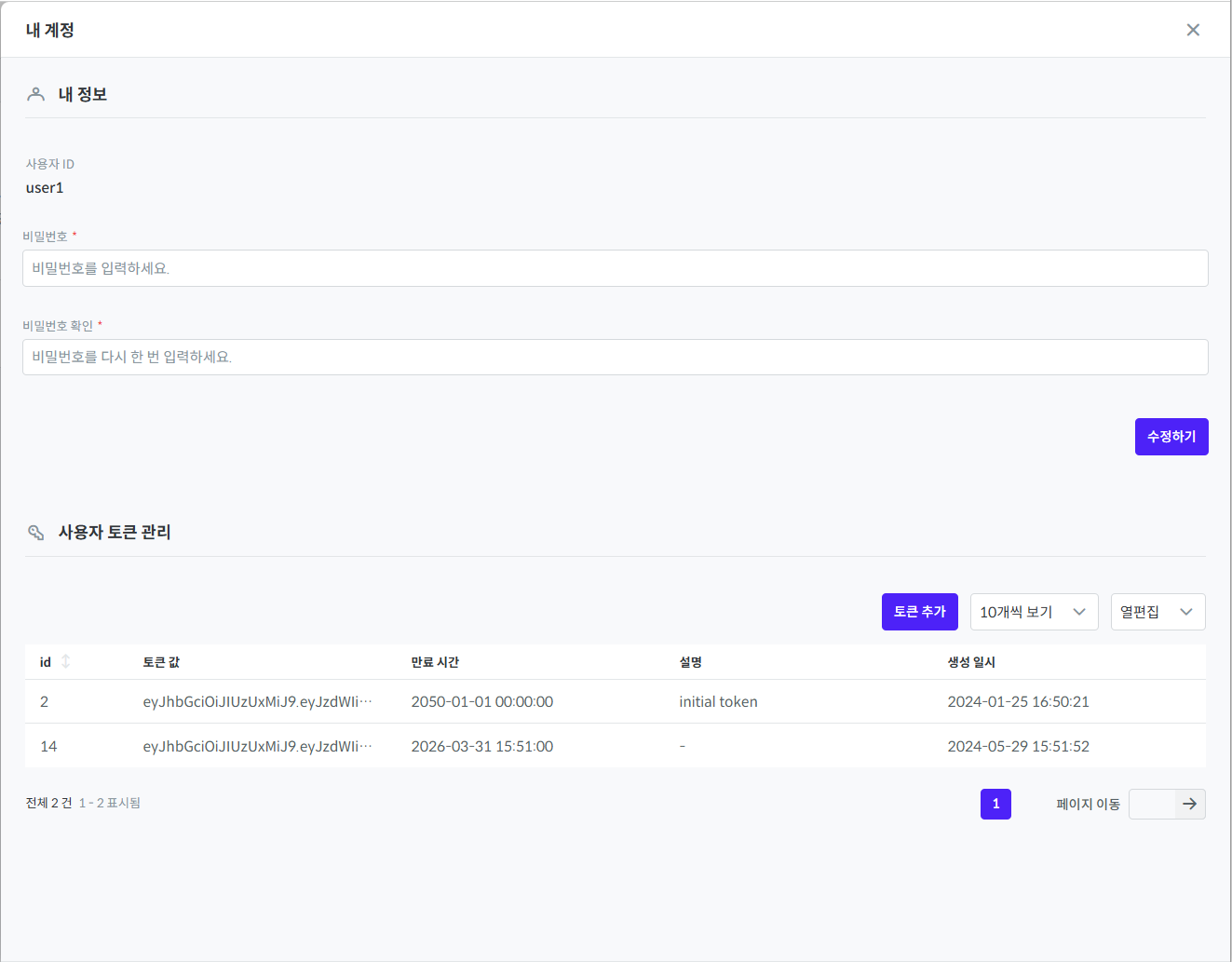
- Under Token management, click the Add token button.
- Enter the Expiration time and a Description, then click the Add button.
- The token is issued.
The issued token must be added to the Token Bearer header when you call the API, or entered as an argument when you create an SDK client.
Analysis requests and callbacks
Users can receive information about the analysis of a request through callbacks.
Specify the callback types you want to receive and the servers to call back when you request the analysis.
- Analysis request process
- Callback types
There are two callback types.
- When the analysis status changes or the analysis information is updated, the analysis status is sent as a callback.
- When every phase has ended, the completion callback is sent. This applies when the analysis
succeeds,fails, or isstopped.
- Callback servers
You can also specify two callback servers, one per callback.
- Status callback server: the user's server that receives the analysis status callback.
- Completion callback server: the user's server that receives the analysis completion callback.
You can also set the same URL for both callbacks so that both are received on the same server.
Analysis result files
When the analysis ends, you can send the analysis result request API to download the analysis results as a file.
Click here to download a sample result file.
result.zip/
    /summary.json
    /asset
    /sbom
        SPDX.spdx
        CycloneDX.json
        SWID.zip
        ...
    /licenseNotice
        HTML.html
        MARKDOWN.md
        TXT.txt
    /issue
        1.json
        2.json
        ...
    /workMessage.json
The downloaded file is compressed as result.zip. For details, see here.
summary.json: A file containing summary information about the analysis. It includes the analysis result, the number of vulnerabilities, analysis time information, and so on.asset: Each individual analysis target identified during the analysis is called an asset. This file contains information about the assets.- Source code and open source analysis: the list of files that were analyzed
- Web vulnerability analysis: the list of collected URLs
issue: A folder that collects information about the issues detected during the analysis. The folder contains multiple JSON files holding the issue information. Note that the issue information provided differs depending on the analysis.- Source code analysis: the name of the issue detection rule, the file, the line, and so on
- Open source analysis: the name of the issue detection rule, the name of the open source component, license information, and so on
- Web vulnerability analysis: the name of the issue detection rule, the analyzed URL, request information including parameters, and so on
workMessage.json: A file that collects work messages recording cautions or warnings related to the analysis that you should review.licenseNotice: A folder that collects the license notices. The folder contains files in text (.txt), Markdown (.md), and HTML (.html) formats. For details, see License notices.sbom: A folder that collects the SBOM files. It contains multiple SBOM files according to format and version. For details, see SBOM.
The licenseNotice and sbom folders are included only when you download the results of an open source analysis.
License notices
Sparrow On-Demand checks open source, commercial software, internally used libraries, and so on, and automatically generates license notices for the user's convenience. However, you must always review the full license text to obtain accurate information. There is no strict standard format for license notices, but there are widely used conventional structures and patterns. Sparrow On-Demand notices display the following information as well.
- Component name
- SPDX ID
- Full license text
- Copyright information
- Source URL
- Component version
SBOM
SBOM stands for Software Bill of Materials; it is a list that records the components and dependencies of a software product. SBOMs are provided in several formats that carry the information required for each purpose. Sparrow On-Demand supports the following representative SBOM formats.
-
SPDX (Software Package Data Exchange): An SBOM format led by the Linux Foundation, generated mainly for use in open source license compliance. Its drawbacks are that the structure is complex and it does not directly support vulnerability information. (*Reference: https://spdx.dev/)
- SPDX 2.2 (.spdx, .json, .xml, .xlsx)
- SPDX 2.3 (.spdx, .json, .xml, .xlsx)
- SPDX 3.0 (.json)
-
SWID (Software Identification Tag): An SBOM format based on NIST and ISO standards, created mainly to track and manage installed commercial software. It is effective when enterprises manage assets or support government procurement.
- SWID (.zip)
-
CycloneDX: An SBOM format led by OWASP, used for software supply chain security and vulnerability response. It is written around security-related information such as CVE and VEX, and its advantages are that the structure is relatively concise and clear and that parsing is fast. (*Reference: https://cyclonedx.org/)
-
CycloneDX 1.4 (.json)
-
CycloneDX 1.5 (.json)
-
CycloneDX 1.6 (.json)
-
NIS‑SBOM standard: The NIS‑SBOM standard proposed by Korea's National Intelligence Service (NIS) is a guideline established to strengthen domestic software supply chain security. It consists of 15 core attributes and includes basic information such as component identification, licenses, hashes, and dependency relationships, as well as items for linking vulnerability information.
-
NIS SBOM standard (v1.0) (.csv)
-
NIS SBOM standard (v1.0) (.json)
-
NIS SBOM standard (v1.0) (.pdf)
-
Result code reference
When an analysis requested by the user does not complete normally, Sparrow On-Demand returns one of the following API result codes or analysis result codes.
API result codes
| API result code (apiResultCode) | Description |
|---|---|
ACCESS_DENIED | The user does not have permission. |
ACCOUNT_NOT_FOUND | The account does not exist. |
ACCOUNT_NOT_FOUND | The account does not exist. |
ACCOUNT_DOES_NOT_EXIST_ON_AUTH_SERVER | The account does not exist. |
ANALYSIS_STOP_ALREADY_COMPLETED | The target to be stopped has already been stopped or completed. |
ANALYSIS_STOP_REQUEST_ALREADY_EXIST | A stop request already exists. |
INACTIVE_STATUS | The account is deactivated. |
INVALID_AUTH | The user's authentication information is not valid. |
INVALID_DATA | An exception that occurs when the requested value is incorrect. |
NO_DATA | The requested data does not exist. |
POLICY_EXPIRE_TIME | The analysis policy (validity period) was violated. |
POLICY_ANALYSIS_COUNT | The analysis policy (number of analyses) was violated. |
RECORD_FILE_INVALID | The login record file entered by the user for the web vulnerability analysis is not valid. |
REQUEST_EXCEPTION | An exception occurred while processing the service request. |
REQUEST_NOT_FOUND | The analysis request does not exist. |
REQUEST_NOT_DONE | The request is still being processed. |
RESOURCE_NOT_FOUND | The resource file cannot be found. |
SERVER_EXCEPTION | An unknown exception occurred. |
STORAGE_QUOTA_EXCEEDED | The temporary storage quota has been exceeded. |
STORAGE_REQUEST_EXCEPTION | An invalid value was entered for Object Storage information in the analysis request, such as an incorrect object or bucket. |
TARGET_ACCESS_FAIL | The web page URL entered by the user for the web vulnerability analysis cannot be accessed. |
TOKEN_DISABLED | The token is not valid. |
VCS_REQUEST_EXCEPTION | An invalid value was entered for VCS information in the analysis request, such as an incorrect URL or branch. |
Analysis result codes
| Analysis result code (ResultCode) | Description |
|---|---|
ANALYSIS_FOUND_FAIL | An exception occurred while retrieving the analysis. |
ANALYSIS_SOURCE_UPLOAD_FAIL | The analysis source could not be uploaded. |
ANALYSIS_SOURCE_DOWNLOAD_FAIL | The analysis source could not be downloaded. |
ANALYSIS_STOP | The analysis was stopped because the user requested that it be stopped. |
ANALYSIS_SUMMARY_UPDATE_FAIL | An exception occurred while updating the analysis information. |
ANALYSIS_WORKER_ASSIGN_FAIL | The analysis failed because no analyzer was assigned. |
ANALYSIS_WORKER_NOT_WORKING | The analysis failed because the assigned analyzer had terminated or, another job was in progress. |
ANALYSIS_WORKER_STOP_FAIL | The user requested that the analysis be stopped, but the analysis was not stopped completely. |
ANALYSIS_SUMMARY_FILE_CREATE_FAIL | Failed to create the analysis summary file. |
ANALYSIS_STOP | The analysis was stopped because the user requested that it be stopped. |
ANALYSIS_ON_FAILURE | The analysis engine failed while running. |
ANALYSIS_WORKER_ASSIGN_FAIL | The analysis failed because no analyzer was assigned. |
ANALYSIS_WORKER_NOT_WORKING | The analysis failed because the assigned analyzer had terminated or, another job was in progress. |
ANALYSIS_WORKER_STOP_FAIL | The user requested that the analysis be stopped, but the analysis was not stopped completely. |
ASSET_CREATE_FAIL | An exception occurred while creating the asset file. |
COMPONENT_SAVE_FAIL | Failed to save the components detected as an analysis result. |
EXECUTOR_EXCEPTION | An exception occurred while executing a command. |
ISSUE_RESULT_CREATE_FAIL | An exception occurred while creating the issue result file. |
ISSUE_SAVE_FAIL | An exception occurred while saving the issues received from the tool. |
ISSUE_SIMILARITY_MODULE_FAIL | Failed to run the similar-issue recommendation module. |
LICENSE_NOTICE_CREATE_FAIL | An exception occurred while creating the license notice. |
POLICY_MAX_SOURCE_SIZE | The source to be analyzed exceeded the allowed size. |
PREPROCESS_EXCEPTION | An exception occurred in storage. |
RECORD_FILE_INVALID | The login record file entered by the user for the web vulnerability analysis is not valid. |
RESULT_FILE_UPLOAD_FAIL | Failed to upload the result file. |
SBOM_ANALYSIS_TARGET_EMPTY | The SBOM analysis target is empty. |
SBOM_CREATE_FAIL | An exception occurred while creating the SBOM. |
SERVICE_DISCONNECT | Failed to connect to the analysis engine. |
SERVICE_REQUEST_EXCEPTION | An exception occurred in the service request. |
SPARROW_PROPERTY_SET_FAIL | Failed to apply the Sparrow property settings. |
STORAGE_EXCEPTION | Apart from the invalid input values above, an incorrect request related to Object Storage information was sent. |
TOOL_HEALTH_CHECK | The health check failed during the analysis. |
VCS_REQUEST_EXCEPTION | An invalid value was entered for VCS information in the analysis request, such as an incorrect URL or branch. |
VCS_EXCEPTION | Apart from the invalid input values above, an incorrect request related to VCS information was sent. |
TARGET_ACCESS_FAIL | The web page URL entered by the user for the web vulnerability analysis cannot be accessed. |
TOKEN_DISABLED | The token is not valid. |